Introduction
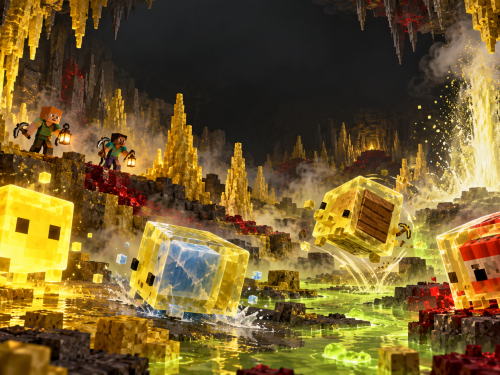
Minecraft Java Edition 26.2, also known as Chaos Cubed, introduces an entirely new underground biome filled with sulfur, cinnabar, bubbling pools, dangerous spikes, cave spiders, and one of Minecraft’s strangest creatures yet: the sulfur cube.
The update also adds buildable geysers, two complete decorative block families, new music, a Java Edition Friends List, and experimental Vulkan rendering support.
Where to Find the New Content
The main new biome is the sulfur cave, which generates naturally underground in the Overworld.
The easiest clue that one is nearby is a sulfur spring on the surface. These colorful formations generate above sulfur caves and consist of sulfur, potent sulfur, and magma blocks. Sulfur springs can appear in four sizes:
- Small
- Medium
- Large
- Extra Large
If you find a sulfur spring, explore or dig carefully beneath it. A sulfur cave may be waiting below.
Blockhead Odyssey note: Sulfur caves and sulfur springs can generate only in terrain created under Minecraft 26.2 or later. Because the Outlands were reset and regenerated for the current Expedition, explorers can encounter the new features there. Older terrain in Odyssia will not be retroactively converted into sulfur caves.
The Sulfur Cave Biome
Sulfur caves are colorful underground caverns marked by bands of bright yellow sulfur and deep red cinnabar. They can contain shallow pools of water, glow lichen, sulfur spikes, potent sulfur, sulfur cubes, and naturally spawning cave spiders.
Come prepared with:
- A pickaxe for collecting sulfur and cinnabar
- Food and armor for dealing with cave spiders
- A shield and milk for surviving poison
- Torches or another reliable light source
- A bucket for transporting a large sulfur cube
- Shears for removing blocks absorbed by sulfur cubes
Watch the ceiling while exploring. Sulfur spikes can fall if their support is removed, and a falling spike can injure anything beneath it.
Sulfur Cubes
Sulfur cubes are new creatures found in sulfur caves. Unlike slimes or magma cubes, their defining ability is an appetite for blocks.
A sulfur cube normally moves as a creature. When a player interacts with it while holding a compatible block, the cube absorbs that block. Its artificial intelligence is then disabled, and it becomes a physics-driven object that players can punch, push, bounce, or slide.
The cube’s movement changes according to the type of block it absorbs.
Basic Sulfur Cube Behavior
- Sulfur cubes follow players holding blocks they can absorb.
- They seek nearby dropped block items and may absorb them.
- When holding a block, they become physical objects that can be punched and pushed.
- A block-filled sulfur cube is protected from player damage and fall damage.
- Using shears on the cube removes its absorbed block and restores its normal movement.
- Killing a large sulfur cube splits it into two smaller sulfur cubes.
- Small sulfur cubes can be fed slimeballs to grow into large sulfur cubes.
- A large sulfur cube can be collected with an empty bucket.
- Sulfur cubes cannot enter boats, but they can ride in minecarts.
Bucket of Sulfur Cube
Use an empty bucket on a large sulfur cube to collect it. The resulting Bucket of Sulfur Cube provides a convenient way to transport the creature out of the caves.
A dispenser can release a sulfur cube from its bucket. Dispensers can also insert or swap blocks inside a cube and use shears to remove an absorbed block, making sulfur cubes useful in automated contraptions.
Sulfur Cube Block Types
The block inside a sulfur cube determines its speed, bounce, friction, air resistance, buoyancy, and other special properties.
Regular
Loose mineral and soil blocks produce a balanced cube with medium speed and bounce. These cubes are buoyant and float in liquids.
Bouncy
Wooden blocks produce a fast, highly bouncy sulfur cube. These cubes are also buoyant and can be used as moving targets, game pieces, or unusual transportation devices.
Slow Bouncy
Stone-like blocks produce a slower cube that retains a high degree of bounce.
Slow Flat
Metal blocks create a slow-moving cube with little bounce.
Fast Flat
Organic blocks create a fast cube with low bounce.
Light
Wool blocks produce a slow but highly bouncy cube with considerable air resistance. Light cubes are buoyant.
Fast Sliding
Ice-related blocks create fast cubes with no bounce and very little ground friction. These are particularly useful for tracks, races, games, and launch systems.
Slow Sliding
Mushroom blocks create slower sliding cubes with no bounce and low ground friction.
High Resistance
Soul sand and soul soil produce extremely slow cubes with high friction and very little bounce.
Sticky
A honeycomb block creates a sticky sulfur cube. It has extremely high ground friction and does not bounce, allowing it to grip surfaces instead of sliding away.
Hot
A magma block creates a hot sulfur cube. It retains generally regular movement properties but damages entities that touch it.
Explosive
A sulfur cube that absorbs TNT becomes an explosive cube. The TNT can be primed by:
- A redstone signal
- Fire
- A dispenser using flint and steel
- A nearby explosion
TNT ignited by fire or redstone has a six-second fuse. TNT triggered by another explosion receives a much shorter randomized fuse of approximately 0.75 to 3 seconds.
Once its TNT has been primed, the cube cannot be collected with a bucket, damaged, or safely disarmed with shears. When it explodes, it does not leave behind smaller sulfur cubes.
Having a sulfur cube absorb TNT awards the new “Uh Oh” Husbandry advancement.
Using Sulfur Cubes in Builds
Sulfur cubes can be used for much more than decoration. Their physical properties allow players to create:
- Target ranges
- Obstacle courses
- Ice tracks and racing games
- Pinball-style contraptions
- Moving hazards
- Redstone-controlled explosives
- Launchers and bounce courses
- Minecart transportation systems
- Multiplayer ball games
Knockback enchantments affect how far a sulfur cube travels when struck, opening additional possibilities for games and machines.
Sulfur and Cinnabar Blocks
Sulfur caves introduce two complete stone-style building families: sulfur and cinnabar.
Sulfur provides bright golden-yellow building materials, while cinnabar offers strong red tones. Both families include:
- Base blocks
- Polished blocks
- Brick blocks
- Chiseled blocks
- Slabs
- Stairs
- Walls
These blocks are especially useful for temples, foundries, mines, industrial builds, warning markers, colorful roofs, and decorative masonry.
Potent Sulfur
Potent sulfur is a more active form of sulfur found naturally inside water pools in sulfur caves. It can also be crafted from nine sulfur blocks.
When placed beneath water, potent sulfur produces bubbles that can travel upward through as many as four water source blocks.
It also releases noxious gas at the water’s surface. The gas can spread across adjacent water to a maximum radius of three blocks and causes nausea to players and nearby mobs.
Potent sulfur cannot be converted back into nine ordinary sulfur blocks, so craft it deliberately.
How to Build a Geyser
Players can construct working geysers using potent sulfur.
The basic vertical arrangement is:
- Place a magma block or source lava block at the bottom.
- Place potent sulfur directly above it.
- Place one to four water source blocks above the potent sulfur.
Magma-Powered Geyser
A magma block creates an intermittent geyser. It erupts at random intervals, producing a plume of water particles and launching entities above it upward.
Lava-Powered Geyser
A source lava block creates a continuously erupting geyser. The eruption sound is slightly quieter than that of a magma-powered geyser.
The lava must be a source block. Flowing lava will not create a continuous geyser.
Geyser Uses
- Player and mob launchers
- Elevators and vertical travel systems
- Water features and fountains
- Adventure-map obstacles
- Mob movement systems
- Hidden entrances
- Redstone and sculk contraptions
Geyser eruptions produce detectable game events when they begin and end, allowing nearby sculk sensors to react to them.
The Ender Dragon is not affected by geyser launches.
Sulfur Spikes
Sulfur spikes generate naturally on sulfur blocks inside sulfur caves. Players can collect and place them as either stalactites or stalagmites.
- Placed on a ceiling, a sulfur spike becomes a stalactite.
- Placed on the floor, it becomes a stalagmite.
- Additional spikes can extend an existing formation.
- Opposing formations merge when their tips meet.
- Sneaking while placing prevents the tips from merging.
- Ceiling spikes can grow when placed beneath sulfur blocks.
- Unsupported stalactites fall.
- Falling stalactites damage entities beneath them.
- Floor spikes break when they lose their support.
- Unlike pointed dripstone, landing on a sulfur stalagmite does not inflict additional damage.
- A thrown trident breaks sulfur spikes.
Four sulfur spikes can be crafted into one sulfur block.
New Music
Java Edition 26.2 adds the new music disc “Bounce” by fingerspit.
The disc has a chance to appear in chest minecarts located inside mineshafts that generate within sulfur caves. When played in a jukebox, it produces a comparator signal strength of eight.
The update also adds five background tracks by fingerspit:
- Shores
- Memories
- Nightly
- Home
- Ebb
Java Edition Friends List
Java Edition now includes an official Friends List. It can be opened through the title screen, pause menu, or by pressing the default O key.
The Friends List allows players to:
- Send friend requests using a player’s profile name
- Accept or decline incoming requests
- Cancel outgoing requests
- Remove existing friends
- See whether friends are offline, online, on a LAN world, in a world, on a Realm, or on a server
Privacy and notification controls are available under Online Options. Players can disable requests, turn off in-game notifications, or limit how much of their activity friends can see.
Experimental Vulkan Rendering
Java Edition 26.2 introduces experimental support for the Vulkan graphics system. The new Graphics API option is located under Video Settings.
The available choices are:
- Default
- Prefer Vulkan (Experimental)
- Prefer OpenGL
OpenGL remains the default in 26.2. Vulkan may improve compatibility or performance on some systems, but it may also cause reduced performance, visual problems, or instability. Unless you are testing or troubleshooting a graphics issue, leaving this setting on Default is recommended.
Quick Exploration Checklist
- Search the surface for a yellow-and-red sulfur spring.
- Explore beneath the spring for a sulfur cave.
- Watch for cave spiders and falling sulfur spikes.
- Mine sulfur and cinnabar for their new building sets.
- Collect potent sulfur from the cave’s water pools.
- Bring shears to safely remove absorbed blocks from sulfur cubes.
- Use slimeballs to grow a small sulfur cube.
- Use an empty bucket to transport a large sulfur cube.
- Search mineshaft chest minecarts for the “Bounce” music disc.
- Experiment carefully before feeding a sulfur cube TNT.
Final Thoughts
Chaos Cubed gives underground exploration a new destination while adding an unusually flexible creature for builders, redstone engineers, minigame designers, and anyone who enjoys controlled chaos.
Whether you are hunting new blocks, constructing a geyser-powered launcher, transporting a sulfur cube home in a bucket, or discovering what happens when one eats TNT, Minecraft Java Edition 26.2 brings plenty of new reasons to venture into freshly generated terrain.
Guide prepared for Blockhead Odyssey. Minecraft Java Edition mechanics may differ from Bedrock Edition.
Official sources:
Minecraft Java Edition 26.2 Release Notes
Minecraft: Chaos Cubed
Need Help?
Most of the information in this guide is applicable to
vanilla Minecraft – Java 26.2.
However, this guide was made specifically for
Blockhead Odyssey SMP – mc.BlockheadOdyssey.com
For more assistance, join us on Discord or explore our other guides!
Good next pages: